
Fisher & Paykel WB30SDEI1 Integrated Warming Drawer
Warming drawer trouble often shows as low heat, a setting that will not hold or an error code on the panel.

Model overview
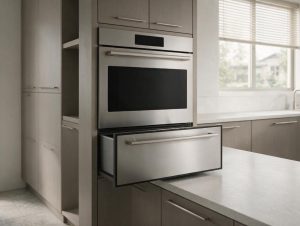
The WB30SDEI1 is an integrated warming drawer from Fisher & Paykel that stands 10 11/16 inches tall and accommodates 16 place settings. It runs six functions, including Rapid Proof, Dehydrate and Slow Cook, with a maximum power of 810 W. A soft-close drawer and a smooth-glass base make it easy to slide in and out, and the panel-ready front accepts custom cabinetry. Capacitive touch controls set the mode. In the metro areas we cover, drawers that will not get hot enough or error codes on the panel are the usual calls. When you book, give the full model number from the rating label, say which temperature or function is off, and include any code shown.
At a glance
| Model | WB30SDEI1 |
|---|---|
| Appliance | Integrated Warming Drawer, 30-inch |
| Common symptoms | oven not heating or slow to preheat; temperature off from the setting; fan, light or display not working; error code on the control panel |
| What you can check | Note the mode used (bake, convection, steam, self-clean) and any code on the display. |
| When to call a technician | If the symptom comes back after the simple checks, or you see a code, leaking water or a burning smell, book a visit. |
Specifications
| Dimensions | Height: 10 11/16 inches. |
|---|---|
| Capacity | Accommodates 16 place settings. |
| Power | Maximum power: 810 W. |
| Installation | Panel-ready for custom cabinetry. |
| Features | Six functions including Rapid Proof, Dehydrate and Slow Cook. Soft-close drawer. |
| Controls | Capacitive touch controls. |
| Care | Smooth-glass base. |
What sets the WB30SDEI1 apart
At 10 11/16 inches tall, the drawer sits low in a cabinet run, and Rapid Proof sets it apart from a plain warming drawer. The panel-ready front blends into cabinetry, so the drawer reads as part of the kitchen. Day to day, the dehydrate and slow cook settings run at low heat for long periods, which is different from simply keeping plates warm.
Service notes for the WB30SDEI1
A warming drawer that will not reach its set heat often points to the heating element, the temperature sensor or the control board, so a technician looks at the sensor and wiring before the element. The owner can safely confirm the setting matches the function, make sure the drawer is fully closed, and clear any items blocking the vent slots. The soft-close mechanism can hold back a drawer that is not seated, so check its position. Avoid placing paper or plastic on the glass base during a long run. Record the function and how long it ran before the fault.
The model number is printed on the rating label, usually on the frame around the door opening, visible with the door open; match it letter for letter before booking, because a single letter can change parts.
Frequently asked questions
How tall is the WB30SDEI1?
It stands 10 11/16 inches tall, so confirm the cabinet space before installing.
How many place settings fit inside?
It accommodates 16 place settings and has six functions, including Rapid Proof and Dehydrate.
Where do I find the full WB30SDEI1 model number?
Check the rating label on the frame around the door opening, visible with the door open. Copy every letter and digit, including the ones at the end.
Do you repair the Fisher & Paykel WB30SDEI1 at home?
Yes. We book in-home visits for this model in the Miami, New York, Houston, Los Angeles and San Diego metro areas. Add the model number and the symptom to the booking form.
Common issues for this model
- Oven not heating or slow to preheat
- Temperature off from the setting
- Fan, light or display not working
- Error code on the control panel
Recommended repair service
Warming Drawer Repair
Warming drawer not holding temperature or refusing to heat? We diagnose Fisher & Paykel warming drawers.
Troubleshooting resources
Note the mode used (bake, convection, steam, self-clean) and any code on the display.
Model-information disclaimer. Confirm your exact model number and specifications with your appliance documentation before booking a repair. Model pages are for identification and compatibility reference.
Tell us what’s wrong — we’ll take it from there
Share a few details and we’ll confirm an appointment. Prefer to talk? Call us and we’ll help right away.