
Fisher & Paykel OB30SDPTX1 Oven
Pyrolytic oven trouble often shows as a door lock that stays engaged, a dead light or a fan that fails.

Model overview
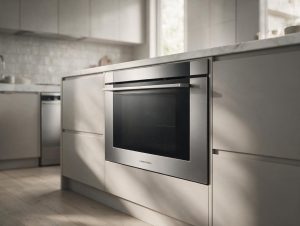
The OB30SDPTX1 is a 30-inch oven from Fisher & Paykel with 4.1 cu ft of total capacity and 17 oven functions. It measures 29 15/16 inches wide and uses a guided touchscreen to walk you through each setting. Three sets of full-extension sliding shelves make trays easy to load and unload, and a wired temperature sensor helps hold the set heat. Pyrolytic self-cleaning clears the cavity, and the finish is stainless steel. In the metro areas we cover, a door lock that stays engaged after a self-clean and dead lights are frequent calls. When you book, give the full model number from the rating label, describe the symptom, and include any code shown.
At a glance
| Model | OB30SDPTX1 |
|---|---|
| Appliance | Oven, 30-inch, 17 Function, Self-cleaning |
| Common symptoms | fan, light or display not working; door lock stuck after self-clean; temperature off from the setting; oven not heating or slow to preheat |
| What you can check | Note the mode used (bake, convection, steam, self-clean) and any code on the display. |
| When to call a technician | If the symptom comes back after the simple checks, or you see a code, leaking water or a burning smell, book a visit. |
Specifications
| Dimensions | Width: 29 15/16 inches. |
|---|---|
| Capacity | Total capacity: 4.1 cu ft. |
| Features | 17 oven functions. Three sets of full-extension sliding shelves. Wired temperature sensor included. |
| Controls | Guided touchscreen cooking. |
| Care | Pyrolytic self-cleaning. |
| Finish | Stainless steel finish. |
What sets the OB30SDPTX1 apart
Three full-extension shelf sets separate this oven from models with fixed racks, because each shelf pulls out without tipping the load. The screen and the stainless front are the parts you see every day, while the sliding shelves change how a heavy tray moves in and out.
Service notes for the OB30SDPTX1
A door lock that holds after a self-clean is usually a thermal cycle issue or a lock motor that needs time, so a technician checks the lock and the cavity temperature before the board. The owner can safely wait until the cavity cools, confirm the touchscreen shows the lock status, and wipe the door gasket. Do not force the door while the lock is engaged. For a fan or light that fails, check the connector behind the control panel. Record the point in the self-clean cycle when the lock engaged.
The model number is printed on the rating label, usually on the frame around the door opening, visible with the door open; match it letter for letter before booking, because a single letter can change parts.
Frequently asked questions
How wide is the OB30SDPTX1?
It measures 29 15/16 inches wide, so confirm the cabinet opening before installation.
How many shelf sets does it have?
Three sets of full-extension sliding shelves make it easier to load and remove trays.
Where do I find the full OB30SDPTX1 model number?
Check the rating label on the frame around the door opening, visible with the door open. Copy every letter and digit, including the ones at the end.
Do you repair the Fisher & Paykel OB30SDPTX1 at home?
Yes. We book in-home visits for this model in the Miami, New York, Houston, Los Angeles and San Diego metro areas. Add the model number and the symptom to the booking form.
Common issues for this model
- Fan, light or display not working
- Door lock stuck after self-clean
- Temperature off from the setting
- Oven not heating or slow to preheat
Related error codes
Fisher & Paykel Oven F443: Inverter Error
F443 is an inverter error on the combi oven; no reset is listed, so book service.
Fisher & Paykel Oven Code F199: Board Configuration Fault
F199 is a board configuration error entry for the Fisher & Paykel combi oven.
Fisher & Paykel Oven F223 Code: RAM Error
F223 is a RAM error on the combi oven. Reset once cool; if it returns, book service.
Fisher & Paykel Oven F1XX Code: Clock Board Fault
F1XX groups the clock board faults of OB60 wall ovens; the manufacturer gives only a short description.
Recommended repair service
Oven Repair
Oven not heating, baking unevenly, or showing an error? We diagnose Fisher & Paykel ovens with a safety-first approach.
Troubleshooting resources
Note the mode used (bake, convection, steam, self-clean) and any code on the display.
Model-information disclaimer. Confirm your exact model number and specifications with your appliance documentation before booking a repair. Model pages are for identification and compatibility reference.
Tell us what’s wrong — we’ll take it from there
Share a few details and we’ll confirm an appointment. Prefer to talk? Call us and we’ll help right away.